
"an explanatory annotation accompanies me on the right"- 1
- I appear when you hover over me 🐭!
In this first tutorial, we will gently begin our journey of discovering .
This will be done through the following steps:
RStudio, the software that will allow us to use the language;Some code examples include annotations on the side, hover over them to display them, as shown below
"an explanatory annotation accompanies me on the right"RStudioUsually, to work with , we use the RStudio1 software which offers an environment that’s a bit less rudimentary than the default graphical interface provided when installing .
To launch an RStudio service on preconfigured servers, we’ll use an infrastructure called SSPCloud which is developed by Insee’s innovation team for teaching or data science projects.

After creating an account on datalab.sspcloud.fr/, click on this button:
After a few moments of launching the service on Insee’s servers, you’ll be able to access your ready-to-use RStudio (live demonstration or memory aid)
RStudio
This first exercise aims, after observing the structure of RStudio’s windows, to get to grips with the interface:
RStudio;File/New File/R script and save it under the name script1.R;list.files function;script1.R the code that lists the files in your working folder;RStudio shortcut CTRL + ENTER to execute this code in the console.We’ll start with one-dimensional objects, that is, lists of values of the same type. For example, ["ENS Ulm", "ENS Lyon", "ENS Paris-Saclay"] or [4 8 15 16 23 42].
These lists of one-dimensional values can be represented by vectors. The four most practical types in are:
We’ll then move to more complex data structures which are actually those we manipulate more commonly: lists and dataframes.
offers different types of numeric objects. For data analysis, we’ll mainly focus on two types:
int for integer)double for floating-point numbers)In practice, the former are a special case of the latter. Unlike other languages, doesn’t attempt to automatically constrain whole numbers to be integers. This is convenient but on large data volumes it can be problematic because doubles are heavier than ints.
Generally, we use the class function to display the type of a object and if we want to be more precise we can use typeof:
class(3)
typeof(3)
class(3.14)
typeof(3.14)
The as.numeric and as.integer functions can be used to convert from one type to another:
# Conversion to int
as.integer(3.79)
[1] 3Be careful with double \(\to\) int conversion, which truncates the decimal part.
# double -> int -> double
as.numeric(
    as.integer(3.79)
)
[1] 3Doubles can also be written in scientific notation:
2e3[1] 2000class(2e3)[1] "numeric"
Like any computer language, is first and foremost a calculator. We can therefore do additions:
# Addition
8 + 9
[1] 17is well designed, it adapts variable types to make them consistent when they can be:
# Addition
8.1 + as.integer(9)
[1] 17.1We of course have access to other standard operations:
# Subtraction
5 - 2
[1] 3# Multiplication
2 * 6[1] 12# Division
9 / 4[1] 2.25We still need to be careful with division by 0
# Division by 0
3 / 0
[1] Inf-5 / 0[1] -InfSome languages, like Python, don’t allow division by 0, they return an error rather than Inf. This is a bit tricky in R because we can have divisions by 0 without realizing it…
Like any calculator, we can apply other types of operations
# Euclidean division: quotient
9 %/% 4
[1] 2# Euclidean division: remainder
9 %% 4[1] 1# Power
2 ^ 5[1] 32# Square root
sqrt(5)[1] 2.236068# Log
log(2)[1] 0.6931472# Exponential
exp(2)[1] 7.389056The order of operations follows the usual convention:
2 + 5 * (10 - 4)[1] 32If we could only use in basic calculator mode, it wouldn’t be a very interesting language for data analysis. The main advantage of is that we can manipulate vectors, i.e., sequences of numbers. We’ll consider vectors to be sequences of numbers ordered in a single column:
\[ \begin{bmatrix} x_1 \\ x_2 \\ \vdots \\ x_n \end{bmatrix} \]
and we’ll apply operations to each row of these vectors. We speak of vectorization of operations to designate an operation that will automatically apply to each element of our vector.
For example, multiplication is vectorial by default:
5*c(1,20,2)[1] 5 100 10Same with addition, as long as we have vectors of consistent size:
c(1,20,2) + c(21,2,20)[1] 22 22 22c(1,20,2) - 3[1] -2 17 -1If the size of vectors isn’t consistent, recycles the smaller vector until reaching the right size
c(1,20,2) - c(1,20)Warning in c(1, 20, 2) - c(1, 20): longer object length is not a multiple of
shorter object length[1] 0 0 1Character strings are used to store textual information. More precisely, they can store any Unicode character, which includes letters from different languages, but also punctuation, numbers, smileys, etc.
To create a character string, we can use either quotes or apostrophes interchangeably.
'word'
"this works too"'
"
[1] "word"
[1] "this works too"Be careful about mixing the two!
print('it's the apostrophe, what a catastrophe')Error in parse(text = input): <text>:1:11: unexpected symbol
1: print('it's
^The second apostrophe is understood as the end of the string, and doesn’t know how to interpret the rest of the sequence.
We must therefore vary as needed:
"it's the apostrophe, no problem"[1] "it's the apostrophe, no problem"' is properly nested within the quotes that delimit our string.This also works in reverse: quotation marks are properly interpreted when they’re between apostrophes.
'quotation marks, "no problem"'[1] "quotation marks, \"no problem\""As the output above shows, it’s possible to properly define special characters of this sort by escaping them with backslashes \:
"quotation marks, \"no problem\""
'it\'s the apostrophe, no problem'\ allows to understand that the apostrophe or quotation mark is part of the character string and not its delimiter.
[1] "quotation marks, \"no problem\""
[1] "it's the apostrophe, no problem" provides by default a certain number of useful functions to extract or transform text vectors. We’ll discover more practical and general ones when we focus on textual data and the stringr package.
The nchar function counts the number of characters in a string, all characters included (letters, numbers, spaces, punctuation…).
nchar("I have 19 characters")[1] 20It shouldn’t be confused with the length function. This one gives us the vector length. For example,
length("I have 19 characters")[1] 1is of size 1 since we have a single element in our vector. If we take a larger dimension vector:
length(c("I have 19 characters", "not me"))[1] 2We correctly get the number of elements in our vector from length.
nchar is a vectorial operation, so we can count the length of each row in our dataset:
nchar(c("I have 19 characters", "not me"))[1] 20 6One of the interests of base text data processing functions is the possibility of automatically reformatting our character strings. For example, the simplest operation is to change the capitalization of our text:
toupper(c("sequence 850", "Sequence 850"))
tolower(c("SEQuEnce 850", "SEQUENCE 850"))[1] "SEQUENCE 850" "SEQUENCE 850"
[1] "sequence 850" "sequence 850"But we can also clean text strings with some base functions:
strsplit(c("a sequence to separate", "anothertoseparate"), split = " ")[[1]]
[1] "a" "sequence" "" "" "" "to" "separate"
[[2]]
[1] "anothertoseparate"At this stage, the output obtained, with [[]] may seem strange to you because we haven’t yet discovered the list type.
Since this type of data isn’t necessarily practical for statistical analysis, for which we prefer formats like vectors, it will be much more practical to use the stringr package to do a split.
We can certainly split our string on something other than spaces!
strsplit(c("a sequence to separate", "anothertoseparate"), split = "to")[[1]]
[1] "a sequence " " separate"
[[2]]
[1] "another" "separate"We can concatenate character strings together, it’s very practical. Unfortunately the + doesn’t work in R for character strings (unlike Python). To do this we use paste or paste0 (a less general version but which is designed for simple concatenations):
paste0(
"The first time Aurélien saw Bérénice,",
" ",
"he found her frankly ugly. She displeased him, in short.",
" ",
"He didn't like how she was dressed."
)
paste(
"The first time Aurélien saw Bérénice,",
"he found her frankly ugly. She displeased him, in short.",
"He didn't like how she was dressed.",
sep = " "
)paste0, we concatenate by joining strings, without spaces.
paste, we can choose how to join strings, here by adding spaces.
[1] "The first time Aurélien saw Bérénice, he found her frankly ugly. She displeased him, in short. He didn't like how she was dressed."
[1] "The first time Aurélien saw Bérénice, he found her frankly ugly. She displeased him, in short. He didn't like how she was dressed."
We can use strings as templates. This is particularly practical for automatically creating text from values from our data. For this we use sprintf:
sprintf("The first time %s saw %s", "Aurélien", "Bérénice")[1] "The first time Aurélien saw Bérénice"sprintf("%s and %s make %s", 2, 2, 2+2)[1] "2 and 2 make 4"%s is used to define where the desired text will be pasted.
In , logical vectors are used to store boolean values, i.e., true (TRUE) or false (FALSE) values.
Logical vectors are commonly used to perform logic operations, data filters and conditional selections. We’ll come back to this later, we’ll use them frequently but indirectly.
5 > 3
2 == 2
0 == (2 - 2)
1 < 0TRUE, because 5 is greater than 3.
TRUE, because 2 equals 2.
TRUE, the operation chain is respected.
FALSE, because 1 is not less than 0.
[1] TRUE
[1] TRUE
[1] TRUE
[1] FALSE
We can generalize comparisons to get vectors:
c(2, 4, 6, 8, 10, 1, 3) %% 2 == 0[1] TRUE TRUE TRUE TRUE TRUE FALSE FALSEWe get TRUE for even numbers, FALSE for odd ones.
Using logical vectors will allow us, on a daily basis, to select data. For example if we have age data, we may only want to keep adults’ names. This can be done following this model:
c('Pierre', 'Paul', 'François', 'and others')[
    c(25, 3, 61, 17) >= 18
]
[1] "Pierre" "François"However we’ll see in the next chapters how to integrate this principle into a more general sequence of operations thanks to the dplyr package.
Factors are used to represent categorical variables, i.e. variables that take a finite and predetermined number of levels or categories.
To convert a numeric or text vector to a factor, we use the factor function:
factor(
    c("capital","prefecture","sub-prefecture","prefecture")
)
[1] capital prefecture sub-prefecture prefecture
Levels: capital prefecture sub-prefecturefactor(c(1,10,3))[1] 1 10 3
Levels: 1 3 10The levels of a factor are the different categories or possible values that the variable can take. We can list them with the levels function
levels(
    factor(
        c("capital","prefecture","sub-prefecture","prefecture")
    )
)
[1] "capital" "prefecture" "sub-prefecture"We can also order these levels if it makes sense when defining the factor. This however involves knowing, a priori our different levels and informing in order:
factor(
    c("capital","prefecture","sub-prefecture","prefecture"),
    levels = c("capital","prefecture","sub-prefecture"),
    ordered = TRUE
)
[1] capital prefecture sub-prefecture prefecture
Levels: capital < prefecture < sub-prefectureUntil now, we’ve had to define our object each time before being able to apply a transformation to it. How can we reuse an object and apply multiple transformations to it? Or perform operations from different objects?
For this, we’ll assign objects to variables. This then allows performing operations from these variables.
In , assignment is done following the format:
variable_name <- objectThe direction of the arrow matters and it’s conventional to put on the left the variable name (and therefore to use variable_name <- object rather than object -> variable_name).
Assignment in the form <- is a specificity of compared to many languages. In most computer languages, like Python for example, assignment is done with =:
variable_name = objectThis is also possible in but it’s more conventional to use <-.
Here’s for example how to create a vector x:
x <- 5
x
[1] 5This can then be reused later in the code:
class(x)[1] "numeric"Variables can be any type of object and we can create a variable from another:
x <- c(5, 10)
y <- x + 2*x
y
[1] 15 30Unlike other programming languages, is said to be dynamically typed: it’s possible to reassign a variable to an object of different type. This facilitates reading and development, but can sometimes generate problems difficult to debug…
We must therefore always pay close attention that the variable type is indeed what we imagine we’re manipulating.
x <- 3
x <- "blabla"
class(x)x is no longer a numeric but a character. Watch out for upcoming operations on x!
[1] "character"There are naturally certain constraints on operations depending on object types.
x <- "test"
y <- 3
x + y+ doesn’t exist for strings as we saw previously
Error in `x + y`:
! non-numeric argument to binary operator
It’s however possible to harmonize types beforehand:
x <- "5"
y <- 3
z <- as.numeric(x)
y + z
[1] 8In , position indices in vectors allow accessing specific elements using their position in the vector. Indices start at 1, which means the first element has an index of 1, the second has an index of 2, and so on2.
x <- 2*seq(1,10)To access a specific element of the vector using its position index, we use the notation [ ]. For example, to get the second element of x, you can do this:
# Access the second element of the vector
second_position <- x[2]
second_position
[1] 4Now, the variable second_position contains the value 4.
We can moreover update the vector x, this won’t change the value of the variable second_position:
x <- seq(5,9)
print(second_position)
[1] 4second_position == x[2][1] FALSEIn , a variable’s value is only changed if there’s, in one way or another, reassignment.
We can also use a sequence of values to retrieve a subset of our vector (this operation is called a slice)
x <- seq(5,15)
x[1:5]
[1] 5 6 7 8 9x[c(2,3,8)][1] 6 7 12It’s also possible to make negative selections, i.e., all values except certain ones. For this, we use negative indices
x[-3]
x[c(-3, -1)] [1] 5 6 8 9 10 11 12 13 14 15
[1] 6 8 9 10 11 12 13 14 15However, it’s not good practice to use numbers directly. Indeed, imagine you transform your vector in a long chain of operations: you no longer necessarily know which positions store which values (and with real datasets you don’t even know exactly which rows of your dataset store which values).
This is why we prefer selections from logical conditions. We saw this previously in this form:
c('Pierre', 'Paul', 'François', 'and others')[
    c(25, 3, 61, 17) >= 18
]
[1] "Pierre" "François"Now that we know intermediate variable assignment, the syntax simplifies, which makes the code more readable.
first_name <- c('Pierre', 'Paul', 'François', 'and others')
age <- c(25, 3, 61, 17)
first_name[age >= 18]
[1] "Pierre" "François"Another example to illustrate with text data:
cities <- c("Paris", "Toulouse", "Narbonne", "Foix")
status <- c("capital","prefecture","sub-prefecture","prefecture")
cities[status == "prefecture"]
[1] "Toulouse" "Foix" We’ll discover in the next chapter a generalization of this approach with data filters.
Real datasets aren’t always complete. They’re even rarely so. For example, in long GDP series, retrospective values may be missing for countries that didn’t exist before a certain date.
Missing values, often represented by NA (Not Available) in , are an essential aspect of data management and one of ’s strengths is offering consistent management of these. For example, if we want to calculate the world average of GDP for a past year: should we exclude or not countries for which we have no information that year or return an error? Appropriate management of missing values is therefore crucial when analyzing data and creating statistical models.
The is.na() function checks if a value is missing in a vector:
data <- c(10, NA, 30, NA, 50)
is.na(data)TRUE for missing values, FALSE otherwise.
[1] FALSE TRUE FALSE TRUE FALSEAppropriate management of missing values is crucial to avoid biases in statistical analyses and to obtain reliable results because missing values are rarely random: there’s often a reason why a value is missing and the assumption of missing at random is often false.
There are several approaches to handle missing values depending on an analysis’s objective. This exceeds the scope of this course but here are, broadly speaking, the three most common strategies:
na.omit() or complete.cases() function. This is for example what linear regression does by default in R. However, this approach can lead to information loss or bias introduction, so it shouldn’t be done lightly;First series of exercises on one-dimensional objects allowing to deepen the concepts seen previously.

Display the type of x when:
x <- 3
x <- "test"
x <- 3.5typeof(3)
typeof("test")
typeof(3.5)Calculate the sum of lengths of each of the following character strings:
x1 <- "a first string"
x2 <- "and a second"
x3 <- "never two without three"
nchar(paste(x1, x2, x3, sep = ""))Here’s a list of municipality codes from the French Official Geographic Code
municipality_list <- c(
  '01363', '02644', '03137', '11311', '12269', '13018', '14458', '15008',
  '23103', '2A119', '2B352', '34005', '2B015', '2A015',
  '38188', '39574', '40223', '41223', '42064',
  '63117', '64218', '65209', '66036', '67515', '68266',
  '77440', '78372', '79339', '80810', '81295', '82067',
  '93039', '94054', '95061', '97119', '97219', '97356', '97421', '97611'
)# Question 1
dep <- substr(municipality_list, start = 1, stop = 2)
# Question 2
length(
unique(dep)
)Remove superfluous spaces at the beginning and end of the following string:
a <- " A very badly formatted string. "trimws(a)[1] "A very badly formatted string."?trimws() in the console to display help for the trimws() function
Since base text data manipulation functions are sometimes a bit difficult to use with , we can go much further when we discover the stringr package.
Matrices can be seen as the two-dimensional extension of vectors. Instead of having data on a single dimension, we stack columns side by side.
\[ X = \begin{bmatrix} x_{11} & x_{12} \\ x_{21} & x_{22} \\ \end{bmatrix} \]
However, matrices have a fundamental limitation: we can only store in a matrix elements of the same type. In other words, we’ll exclusively have numeric matrices, character matrices or logical matrices. It’s impossible to build a matrix where some variables are numeric (for example survey respondents’ age) and others are character type (for example their sector of activity).
Matrices therefore don’t constitute an object type likely to store the statistical information usually used in social surveys. Mixing types isn’t practical, which is why data analysis practitioners use them little3.
We therefore propose an exercise on matrices but we’ll quickly move to more flexible types, more useful for data analysis where variables are of diverse types.
Given a matrix:
X <- matrix(letters[1:20], nrow = 4, ncol = 5)X[1,1]
X[1,]
X[,1]
X[2:3,c(1,3)]X[*]. With matrices the principle is the same but we add a dimension X[*,*]
Lists constitute a much richer object type that precisely allows bringing together very different types of objects: a list can contain all object types (numeric vectors, characters, logicals, matrices, etc.), including other lists.
This very great flexibility makes the list the object of choice for storing complex and structured information, particularly results of complex statistical procedures (regression, classification, etc.). For more structured data, as datasets are, we’ll see next that we’ll use a special type of list: the dataframe.

R by Dall-E-2Here’s a list illustrating the principle of storing heterogeneous data in the same object:
my_list <- list(
    1,
    "text",
    matrix(letters[1:20], nrow = 4, ncol = 5),
    c(2, 3, 4)
)[[]] notation to access the 2nd element of our list to the 2nd number within the last element of our matrixmunicipalities in your list storing the following data c('01363', '02644', '03137', '11311')departments element by extracting the first two digits of your municipalities element# Question 1: display the list
my_list
# Question 2: Access the second element of the list
my_list[[2]]
my_list[[4]][2]
# Question 3: update the list with a named element and access it
my_list[['municipalities']] <- c(
'01363', '02644', '03137', '11311'
)
my_list[['municipalities']]
# Question 4: perform an operation
my_list[['departments']] <- substr(my_list[['municipalities']], start = 1, stop = 2)When using lists, we can perform operations on each element of our list. This is called looping over our list.
In this exercise, we’ll discover how to apply the same function to our list’s elements using lapply.
typeof of the element is “double” and 0 otherwise# Question 1
length(my_list[[1]])
# Question 2
list_length <- length(my_list)
# Question 3
as.numeric(
lapply(my_list, function(l) typeof(l) == "double")
)?lapply doesn’t help
Example of using lapply to sum in each element of our list
my_number_list <- list(c(1,2), seq(1,10))
lapply(my_number_list, sum)
[[1]]
[1] 3
[[2]]
[1] 55This is the central object of data analysis with . These objects indeed allow representing in table form (i.e. a two-dimensional object) data of both quantitative nature (numeric variables) and qualitative (character or factor type variables).
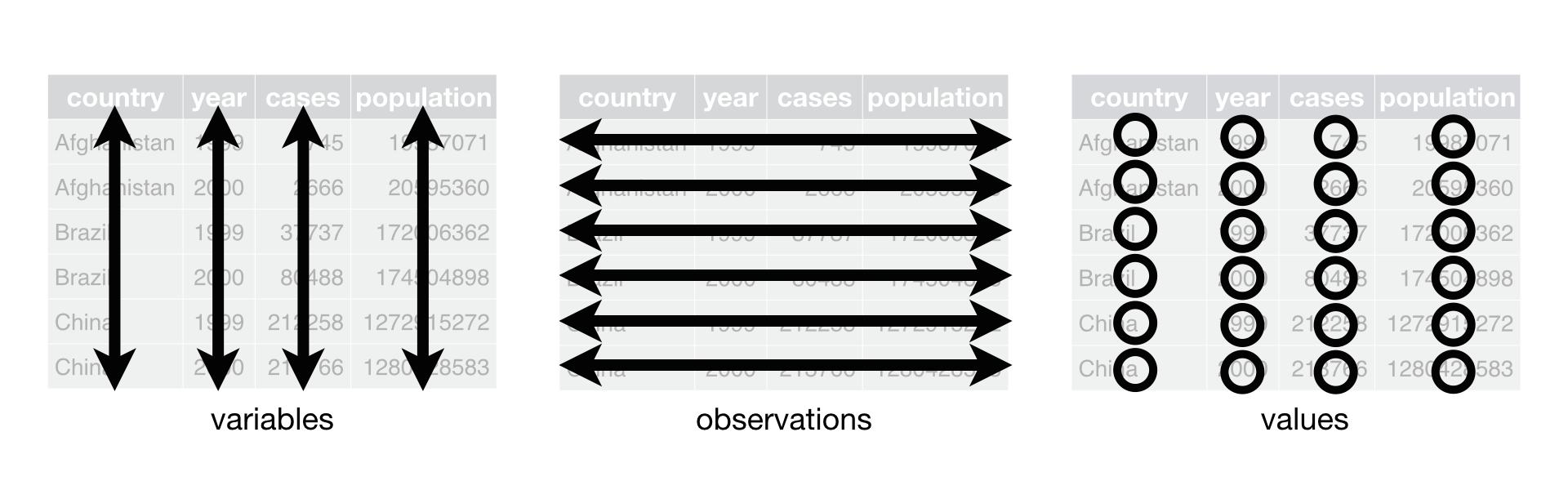
Here’s for example a dataframe:
# Creating the data.frame df
df <- data.frame(
  var1 = 1:10,
  var2 = letters[1:10],
  var3 = rep(c(TRUE, FALSE), times = 5)
)
Its internal structure can be verified with the str function:
str(df)'data.frame': 10 obs. of 3 variables:
$ var1: int 1 2 3 4 5 6 7 8 9 10
$ var2: chr "a" "b" "c" "d" ...
$ var3: logi TRUE FALSE TRUE FALSE TRUE FALSE ...When working with R, one of the functions we use most is head. It displays the first \(n\) rows of our dataset:
head(df) var1 var2 var3
1 1 a TRUE
2 2 b FALSE
3 3 c TRUE
4 4 d FALSE
5 5 e TRUE
6 6 f FALSEIt’s also possible to use RStudio’s viewer to display datasets.
Be careful however, this viewer can encounter performance problems and crash your R session when the dataset starts to be of considerable size.
I recommend rather using head or selecting rows randomly with sample:
df[sample(nrow(df), 3), ] var1 var2 var3
8 8 h FALSE
2 2 b FALSE
3 3 c TRUEFrom a structural point of view, a data.frame is actually a list whose all elements have the same length: this is what allows representing it in the form of a two-dimensional table.
is.list(df)[1] TRUElapply(df, length)$var1
[1] 10
$var2
[1] 10
$var3
[1] 10Therefore, data.frames borrow their characteristics sometimes from lists, sometimes from matrices as the following exercise shows:
dfdfdf. Is this the behavior of a matrix or a list?df. Is this the indexing behavior of a matrix or a list?var1 and var2.dim(df)
nrow(df)
ncol(df)
length(df) #like a list
df[3, c("var1","var2")]The interest of using a data.frame is that we can easily update our data during statistical analysis. The most classic operations, which we’ll come back to in the next chapter, are
There are several ways to refer to an already existing column of a dataframe. The simplest is to use the structure dataframe$column. This will give us a vector and we fall back on this format we already know:
class(df$var1)[1] "integer"var4 column in our dataset equal to the square of var1var5 column in our dataset concatenating the first two variables generalizing the schema 1=a.df_small1 dataframe for rows where the logical condition var3 is verifieddf_small2 dataframe for rows where var1 is even (see above the example on Euclidean division for the model)The next chapter will allow us to go much further thanks to the tidyverse ecosystem and particularly its flagship package dplyr. Without this set of packages greatly facilitating statistical analysis, wouldn’t have become one of the two flagship languages of statistics.
To install RStudio yourself, instructions are here. However, for this course, you won’t need to do the installation, we’ll use a preconfigured infrastructure. This way, we’ll have access to the same environment.↩︎
This remark may seem trivial but, in computer science, it isn’t. Many languages (Python, C) have indexing that starts at 0, as is the convention in algebra. This means the first element has an index 0, the second index 1 and the last an index \(n-1\).↩︎
The matrix object will mainly be used by mathematical statistics researchers or algorithm specialists who will manipulate low-level numeric objects.↩︎